


Table of Contents
ToggleSummary:
This blog explains how FusionPBX, AI services, and CRM platforms work together, covering call flows, ESL-based integrations, latency considerations, and deployment best practices. Read on to discover the architecture and integration approach needed to build scalable and intelligent communication workflows.You started by trying to figure out whether to integrate FusionPBX with your CRM or with your voicebot first. An hour into the research, you’re not sure that’s even the right question.
Some articles suggest you should start with the call flow. Others say the CRM. Others assume you’ll integrate everything at once. Nobody seems to be answering the actual question: how do these three systems fit together, in what order, and with what tools?
This is the point where many teams stop planning and start stitching together integrations that create more complexity than value.
The reality is that FusionPBX, AI voicebots, and CRM platforms are not separate projects. They work best when designed as a connected communication workflow. When integrated correctly, calls can be answered intelligently, customer information can appear instantly, and every interaction can be logged automatically without adding extra steps for agents.
This guide explains how Asterisk AI integration works, how AI voicebots and CRM systems connect with telephony platforms like FusionPBX, and the architecture, tools, and best practices needed to build a reliable workflow from the start.
Before the integrations, it helps to understand how the pieces fit together.
What is FusionPBX AI Integration?
FusionPBX AI integration is the process of connecting FusionPBX with AI voicebots, CRM platforms, and business applications to automate customer interactions and workflows.
When architecting Asterisk with FusionPBX, the platform moves beyond being a standalone PBX and becomes the communication layer connecting callers, AI services, and customer data. This setup enables faster responses, automated actions, and more personalized customer experiences.
1. Core Components of FusionPBX AI Integration:
Several technologies work together to enable FusionPBX AI integration. Each component plays a specific role in handling calls, data, and automation.
FusionPBX: Manages extensions, call routing, dial plans, and overall telephony operations.
FreeSWITCH: Powers the underlying call processing and media handling required for voice communications.
AI Services: Provide speech recognition, natural language understanding, and voice responses for AI voicebots.
CRM Systems: Store customer records, conversation history, tickets, leads, and other business data.
APIs and Webhooks: Enable real-time communication between FusionPBX, AI platforms, and CRM applications.
2. Common Use Cases:
The combination of FusionPBX, AI, and CRM integration can support a wide range of customer-facing and internal workflows.
AI Call Handling: Answer routine inquiries and route callers without agent intervention.
Lead Qualification: Gather caller information and qualify prospects before transferring calls.
Customer Support Automation: Handle FAQs, appointment scheduling, and status updates automatically.
CRM Synchronization: Log calls, update records, and surface customer information during conversations.
Together, these components turn FusionPBX from a phone system into an intelligent communication platform.
Now let’s see how these systems connect behind a live customer conversation.
How Does FusionPBX AI Voicebot Integration Work
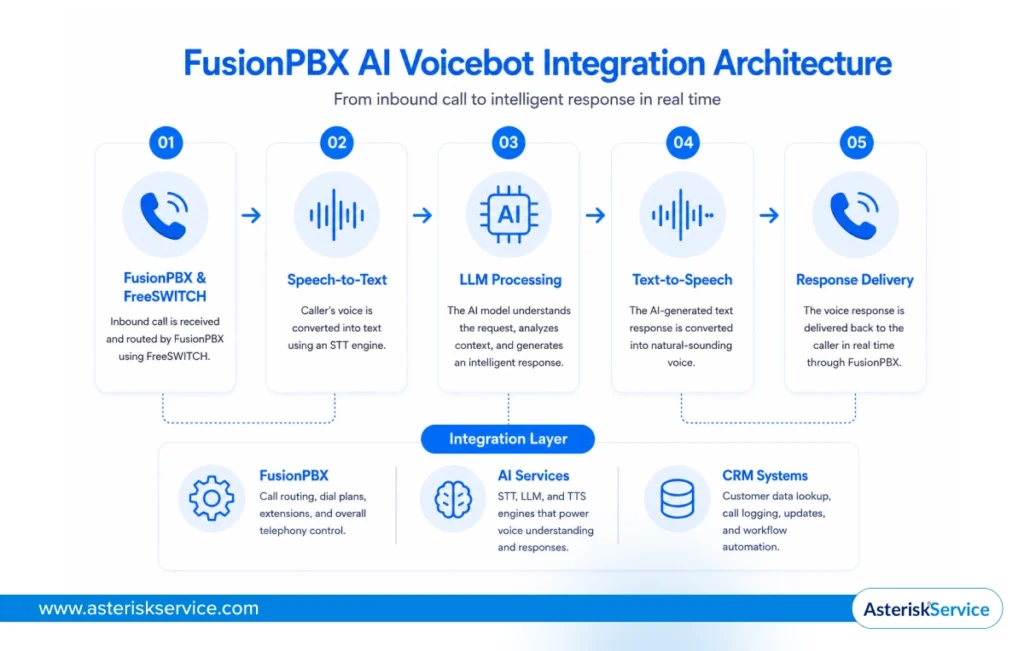 FusionPBX AI voicebot integration connects incoming calls to AI services that can understand, process, and respond to conversations in real time. This capability is one of the reasons many businesses consider a migration from free PBX to Fusion PBX when looking to add intelligent voice automation.
When a caller contacts FusionPBX, the call is routed through FreeSWITCH and sent to an AI workflow. The caller’s speech is converted into text using a speech-to-text (STT) engine. The transcribed text is then processed by a large language model (LLM), which understands the request and generates a relevant response. Finally, a text-to-speech (TTS) engine converts that response into natural-sounding audio and delivers it back to the caller.
1. Call Flow Architecture
A FusionPBX AI voicebot follows a simple workflow that converts speech into actions and responses in real time.
- Inbound Call: The customer call enters FusionPBX and is routed to the configured AI workflow.
- Speech-to-Text: The caller’s voice is converted into text for processing.
- LLM Processing: The AI model interprets the request and generates a response.
- Text-to-Speech: The generated response is converted into spoken audio.
- Response Delivery: The caller receives the AI-generated response in real time.
2. Integration Methods
Although commonly associated with asterisk based CRM integration, FusionPBX can also connect with AI platforms through multiple integration methods, depending on the deployment requirements and the level of customization needed.
APIs: Connect FusionPBX with AI platforms and external business applications.
ESL: Enables real-time event handling and call control through the FreeSWITCH Event Socket Library.
MRCP: Connects speech recognition and voice synthesis engines to the communication platform.
SIP-Based Integrations: Uses SIP connections to exchange media and signaling between systems.
The entire workflow typically happens within seconds, creating a seamless conversation between the caller and the AI voicebot.
Understanding the call flow is important, but successful deployments depend on how the integration is actually built.
Let’s look at the steps involved in connecting FusionPBX to AI voicebots.
How to Integrate FusionPBX With AI Voicebots
Integrating FusionPBX with AI voicebots involves connecting your telephony platform with speech processing, AI models, and call automation workflows. Much like preparing your Asterisk deployment for AI and voice automation, the process requires careful API configuration, AI service integration, call routing setup, and performance testing to ensure everything works together seamlessly.
Step 1: Configure FusionPBX APIs
Start by enabling the APIs and integration interfaces required for external communication. These APIs allow FusionPBX to exchange call events, customer information, and workflow data with AI platforms and business applications.
Ensure authentication, permissions, and security settings are configured before connecting external services.
Step 2: Connect AI Services
The next step is connecting the speech and AI engines that will power the voicebot.
A typical FusionPBX AI integration includes a speech-to-text engine for transcription, an LLM for conversation processing, and a text-to-speech engine for voice responses. Common choices include OpenAI, Deepgram, Google Speech, and Azure Speech Services.
Step 3: Build Call Routing Logic
Once the AI services are connected, define how calls should move through the workflow.
This includes determining which calls the AI voicebot handles, when to transfer calls to agents, and how to retrieve customer information from CRM systems during conversations.
Step 4: Test and Optimize Call Flows
Before deployment, validate the complete call journey from start to finish.
Test speech accuracy, response quality, call transfer scenarios, and CRM synchronization. Continuous monitoring and optimization help reduce latency and improve the overall caller experience.
A successful FusionPBX AI voicebot deployment depends as much on workflow design as it does on the underlying technology.
When these steps are implemented correctly, FusionPBX can support intelligent and highly automated customer conversations.
One of the most common ways to build these integrations is through the FreeSWITCH Event Socket Library (ESL).
How To Use ESL For FusionPBX AI Integration
ESL, or Event Socket Library, is one of the most widely used methods for building FusionPBX AI integrations because it provides real-time access to FreeSWITCH call events and controls.
This event-driven approach makes it ideal for developing event-driven AI voice applications that need to respond instantly as calls are created, answered, transferred, or disconnected. As a result, ESL is commonly used for AI voicebots, CRM lookups, call routing, and workflow automation.
Why is ESL commonly used?
FusionPBX runs on FreeSWITCH, and ESL acts as a bridge between the telephony platform and external applications.
Developers can listen for call events, retrieve caller information, trigger AI workflows, and exchange data with CRM systems in real time.
This flexibility makes ESL a popular choice for advanced FusionPBX AI voicebot integrations.
Sample Workflow
A typical workflow begins when an incoming call reaches FusionPBX.
The ESL application detects the call event and captures the caller’s details. It can then trigger a CRM lookup, retrieve customer information, and, if required, pass the conversation to an AI voicebot.
Based on the caller’s request, the workflow can continue with automated responses, agent transfers, or CRM updates.
Node.js Example
The following example listens for a CHANNEL_CREATE event, captures the caller number, and triggers a CRM lookup workflow.
const esl = require('modesl');
const conn = new esl.Connection(
  '127.0.0.1',
  8021,
  'ClueCon',
  () => {
    conn.events('plain', 'CHANNEL_CREATE');
  }
);
conn.on('esl::event::CHANNEL_CREATE::*', (event) => {
  const caller =
    event.getHeader('Caller-Caller-ID-Number');
  console.log(`Incoming call from: ${caller}`);
  // Trigger CRM lookup
  lookupCustomer(caller);
});
function lookupCustomer(number) {
  console.log(`Searching CRM for ${number}`);
}
This simple example demonstrates how FusionPBX can use ESL to connect call events with AI services and CRM workflows in real time.
How to Integrate FusionPBX With CRM Systems
FusionPBX CRM integration connects your phone system to customer data platforms to automate information sharing before, during, and after calls.
Instead of switching between applications, agents can access customer records, call history, and lead information directly from their workflow. This helps improve response times and keeps customer data up to date across systems.
1. CRM Integration Architecture
A typical FusionPBX CRM integration includes FusionPBX, a CRM platform, and an integration layer powered by APIs or webhooks.
When a call is received, FusionPBX can trigger a CRM lookup, retrieve customer details, and display relevant information to the agent. After the call ends, call records and interaction data can be automatically pushed back to the CRM.
2. Data Synchronization Workflow
The integration process starts when a caller contacts the business.
FusionPBX identifies the caller and sends a request to the CRM platform. Customer records are retrieved and displayed during the conversation. Once the interaction is complete, call details, notes, recordings, and outcomes can be synchronized automatically.
This creates a consistent flow of information between communication and customer management systems.
3. Popular CRM Platforms
FusionPBX can integrate with a wide range of CRM platforms through APIs, webhooks, and custom connectors.
- Salesforce is commonly used for enterprise customer management and call activity tracking.
- HubSpot helps sales and support teams manage leads, conversations, and customer engagement.
- Zoho CRM supports contact management, workflow automation, and customer service operations.
- Bitrix24 combines CRM capabilities with collaboration and communication tools.
- VTiger is often used for customer relationship management, sales tracking, and support workflows.
The specific CRM matters less than having a reliable integration that keeps customer data and communication records synchronized.
When CRM data and call workflows stay connected, every conversation becomes more informed and efficient.
The next decision is choosing the AI engines that will power speech recognition and voice responses within the workflow.
Best AI Speech Engines For FusionPBX AI Voicebots
Choosing the right speech engine depends on your priorities. Some platforms focus on conversational AI, while others prioritize transcription speed, accuracy, or deployment flexibility.
| AI Engine | AI Strength | Best for |
|---|---|---|
| OpenAI Realtime | Conversational intelligence | AI voice agents |
| Deepgram | Fast transcription | Real-time STT |
| Google Speech | High accuracy | Enterprise deployments |
| Azure Speech | Microsoft ecosystem support | Azure environments |
| UniMRCP + Open Source Models | Greater control . | Custom deployments |
No single engine is the best fit for every deployment. The right choice depends on your latency requirements, budget, integration needs, and level of customization.
How to Choose The Right Engine
The right AI speech engine depends on the goals of your FusionPBX AI integration. Consider the following factors before making a decision:
- Conversation Quality: Choose platforms with strong language understanding if your voicebot handles complex customer interactions.
- Response Speed: Low-latency engines enable more natural, responsive conversations.
- Speech Accuracy: Look for high transcription accuracy, especially in noisy environments or multilingual deployments.
- Integration Requirements: Ensure the engine works well with your existing FusionPBX, CRM, and AI workflow architecture.
- Scalability: Consider how the platform will perform as call volumes increase.
- Deployment Flexibility: Some solutions offer managed cloud services, while others provide greater control through self-hosted deployments.
- Cost Structure: Evaluate pricing based on call duration, transcription volume, and AI processing requirements.
The best choice is the one that balances accuracy, speed, scalability, and integration needs for your specific use case.
The next question is how much delay the caller experiences.
What Causes Latency In FusionPBX AI Integration
Latency in FusionPBX AI integration is the time it takes for a caller’s speech to be processed and returned as a response. Lower latency creates more natural conversations, while higher latency can make interactions feel slow and disconnected.
In a typical FusionPBX AI voicebot workflow, audio passes through multiple systems before a response is delivered. Each stage adds a small delay, which can accumulate if the integration is not optimized.
1. Typical Response Timeline
The response journey usually follows a predictable sequence:
| Stage | Typical Latency |
|---|---|
| Network Transit | 20-50 ms |
| Speech-to-Text | 50-150 ms |
| LLM Processing | 100-400 ms |
| Text-to-Speech | 50-150 ms |
| Response Delivery | 20-50 ms |
The total response time often ranges from a few hundred milliseconds to over a second, depending on the AI services being used.
2. Latency Sources
Most delays occur during speech transcription, AI processing, and voice generation.
Network distance between systems can also increase response times. Integrations that rely on multiple external services may experience additional delays due to API communication and data transfers.
3. Latency Optimization
Reducing latency starts with choosing low-latency speech and AI providers.
Deploying services closer to users, enabling audio streaming, optimizing API calls, and minimizing unnecessary workflow steps can significantly improve response times.
Regular monitoring also helps identify bottlenecks before they impact the caller experience.
Fast responses are essential because even highly accurate AI voicebots can feel ineffective if callers wait too long.
The goal is not just accurate responses, but responses that arrive fast enough to feel conversational.
Beyond speed, AI can also automate a wide range of business workflows.
Best Practices For FusionPBX AI Integration
The best FusionPBX AI integration practices focus on building a secure, scalable, reliable, and well-monitored communication environment. Following these practices helps ensure consistent performance as call volumes and AI workloads grow.
1. Security
Protect all communication between FusionPBX, AI services, and CRM platforms using encrypted connections and secure authentication methods. Access controls, API security, and regular updates help reduce the risk of unauthorized access and data exposure.
2. Scalability
Design the integration to handle future growth from the beginning. Scalable architectures enable the addition of AI services, CRM workflows, and call-processing resources without disrupting operations.
3. Monitoring
Monitor call quality, API performance, AI response times, and system health continuously. Real-time visibility helps identify issues early and maintain a consistent caller experience.
4. Reliability
Implement redundancy and failover mechanisms for critical services. If an AI engine, API, or integration component becomes unavailable, calls should continue without affecting business operations.
Strong FusionPBX AI integrations are built not only for today’s workloads but also for future growth and operational stability.
With the key components, workflows, and best practices covered, let’s bring everything together.
Key Takeaways?
Integrating FusionPBX with AI voicebots and CRM systems is ultimately about creating a connected communication workflow rather than managing separate technologies. The shift toward unified experiences is also being driven by customer expectations, with 67% of users comfortable with AI handling support tasks and 91% of customer experience leaders believing AI can deliver highly personalized services.- FusionPBX AI integration connects telephony, AI services, and CRM platforms into a single workflow.
- AI voicebots can automate customer interactions using STT, LLM, and TTS technologies.
- APIs, ESL, MRCP, and SIP-based integrations enable real-time communication between systems.
- CRM integration helps synchronize customer data, call records, and business workflows.
- Security, scalability, monitoring, and reliability are essential for long-term success.
At Asterisk Service, we design and implement FusionPBX AI integrations that connect voicebots, CRM systems, and business workflows into scalable and production-ready communication solutions.