


You have an Asterisk call connected to an AI model. The AI can understand speech. It can generate a response. Everything looks ready.
Except for one thing: how does the live call audio actually get there?
That question quickly takes you from a simple WebSocket connection to chan_websocket, ARI, codecs, media frames, audio pacing, and latency.
And suddenly, the challenge isn’t connecting Asterisk to AI. It’s keeping the conversation moving in real time.
This guide shows you how to stream Asterisk call audio to an AI model over WebSockets, how the media path works, and where Asterisk Development fits when you need to build and integrate a production-ready voice solution.
So, where does your caller’s audio actually go once Asterisk hands it to WebSocket?
What is Asterisk Media Over WebSocket?
Asterisk media over WebSocket lets you exchange live call audio with an external application through a WebSocket connection. With chan_websocket, you can send and receive audio as binary media frames without building the RTP packet-handling layer yourself.
How WebSocket Fits Into Asterisk?
When you work with Asterisk WebSocket, it helps to separate three different uses:
- SIP over WebSocket handles signaling for WebRTC clients.
- ARI WebSocket handles events and application control.
- Media over WebSocket carries the actual call audio.
For an AI voice application, that third path is the one you care about.
Your Asterisk system can send the caller’s audio to an external application, where you can process it with speech recognition or a real-time AI model. The application can also send audio back to Asterisk for playback.
Your WebSocket connection is not the AI layer. It is the bridge that moves your call audio between Asterisk and your AI application.
That distinction matters when you prepare your Asterisk deployment for AI and voice automation, because your architecture needs to account for codecs, AI services, and call-control logic from the start.
So, how does your caller’s voice travel from Asterisk to your AI model?
How to Stream Asterisk Call Audio to an AI Model
You can stream Asterisk call audio to an AI model by placing a media WebSocket layer between Asterisk and your AI application. Your audio flows from the live call to the WebSocket server, through AI processing, and back to Asterisk for playback.
1. The Asterisk-to-AI Audio Flow
Think of your setup as a continuous audio loop:
Caller → Asterisk → chan_websocket → WebSocket server → STT/AI model → TTS → WebSocket server → Asterisk → Caller
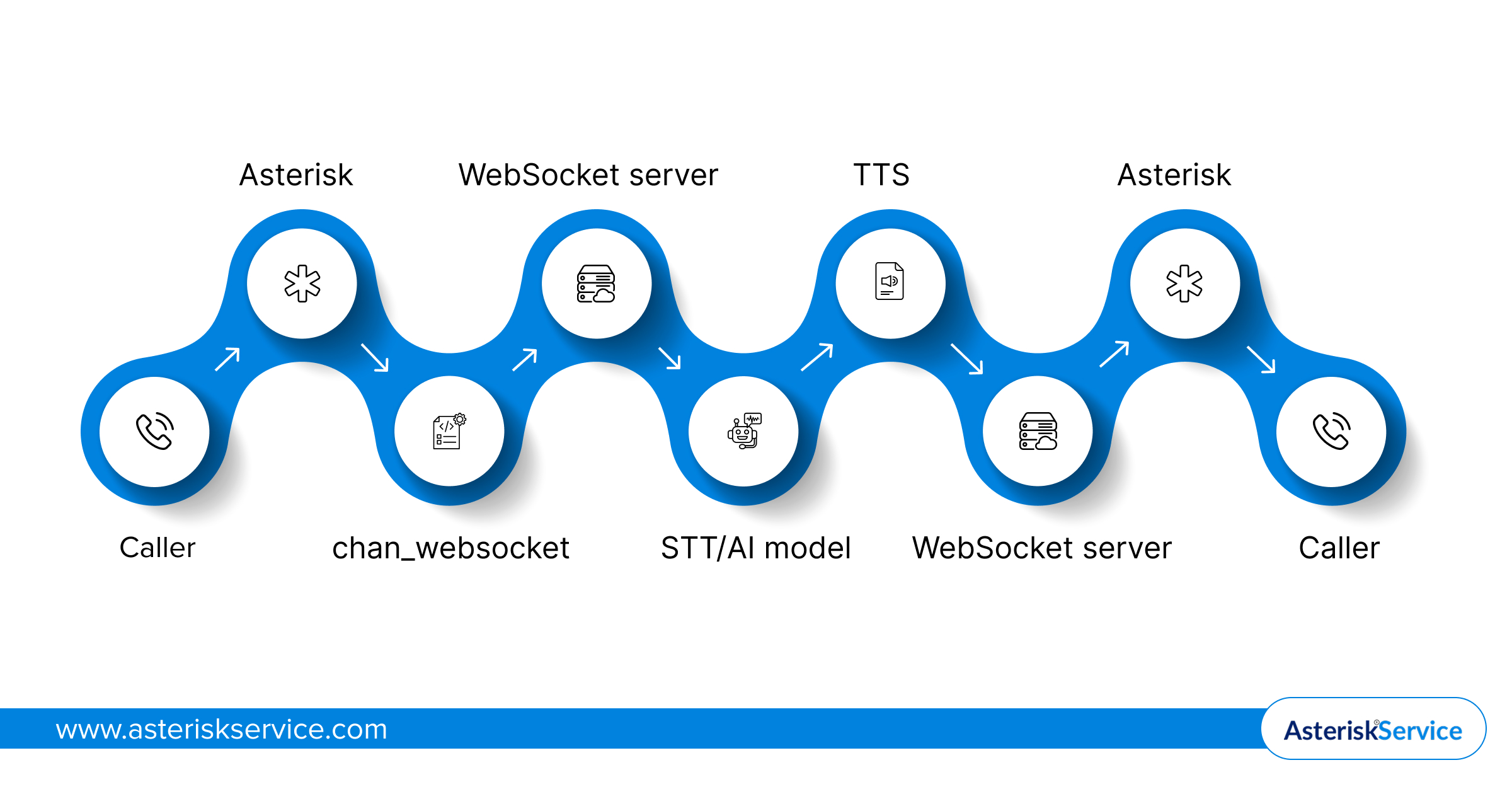
Your WebSocket server acts as the bridge between telephony and AI, carrying audio to AI for speech recognition, reasoning, and response generation.
It receives the caller’s audio as binary media frames and passes it to your speech or AI pipeline.
The AI can then process the incoming stream, generate a response, and return synthesized audio through the same media path.
2. Where Each Component Fits
| Component | Role in your setup |
| Asterisk | Handles the call and media |
| WebSocket | Moves live audio between systems |
| AI application | Processes speech and generates responses |
For a real-time voice agent, you want this pipeline to keep moving rather than wait for the caller to finish speaking.
That is what makes streaming different from recording a call and sending the file to an AI model later.
Your next concern is how Asterisk actually establishes and manages this media WebSocket connection.
But how does your Asterisk setup actually establish that WebSocket media path?
How chan_websocket Works in Asterisk
chan_websocket gives you a native way to move live call audio between Asterisk and an external application over WebSockets. It handles the media framing and WebSocket transport, so your application can focus on processing the audio.
1. How the WebSocket Media Path Works
When you use chan_websocket, your media path looks like this:
Asterisk → WebSocket connection → Your application → AI processing
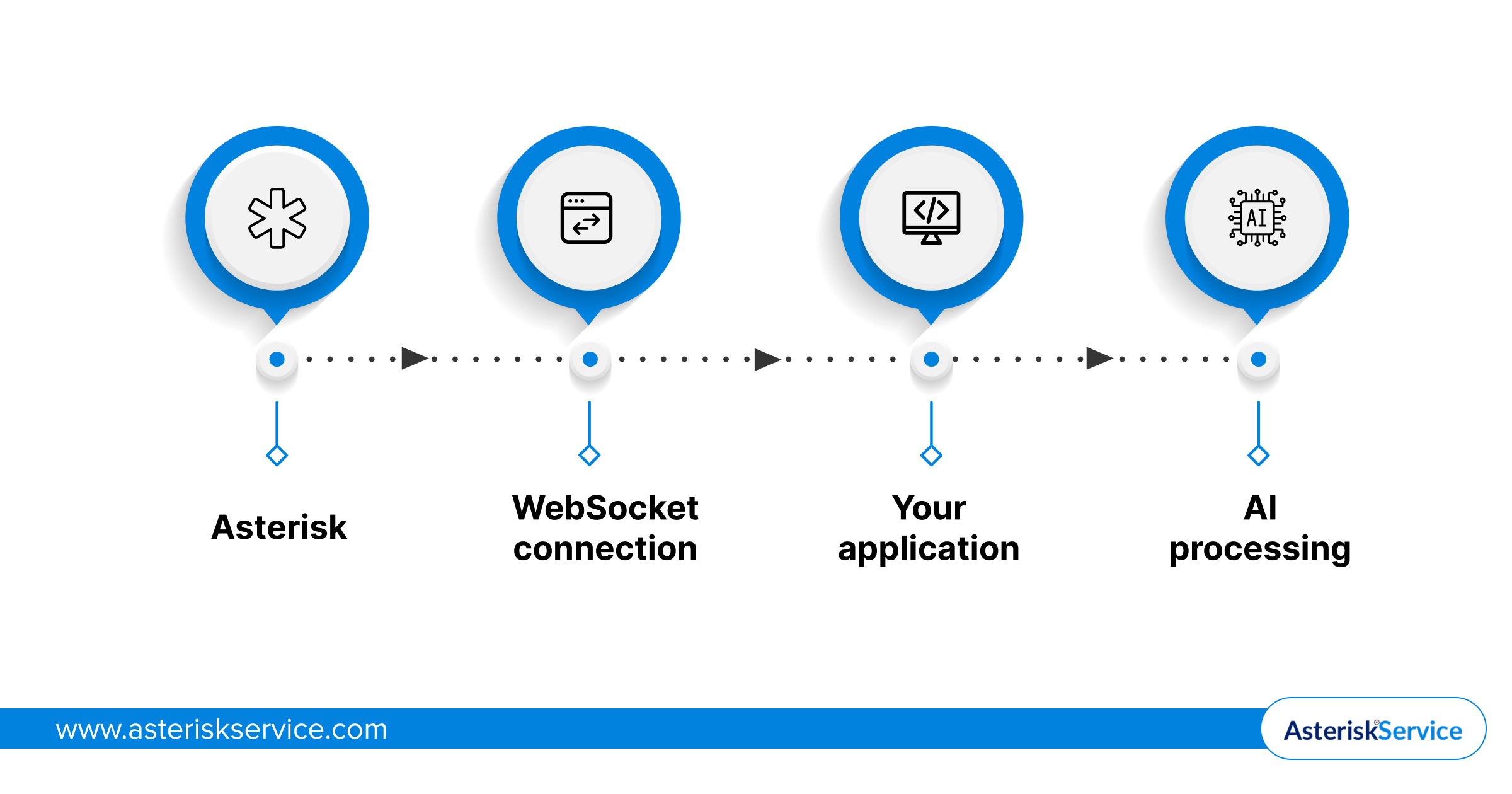
For bidirectional audio, the same connection can carry audio back to Asterisk for playback.
Your application receives audio frames from Asterisk and sends processed or generated audio back when your AI model responds.
2. Where ARI Fits In
You can use ARI External Media to create an external media channel and connect your call to a WebSocket-based media endpoint.
This gives you a clean separation:
- ARI controls how your call connects to the external media channel.
- chan_websocket handles the WebSocket media transport.
- Your application handles STT, AI processing, TTS, and business logic.
Asterisk also communicates connection details through media events such as MEDIA_START, helping your application understand the audio stream it has received.
The important part is that you are moving the live media stream, not passing an audio file after the call.
That makes the WebSocket path suitable for AI with Asterisk for advanced call routing and voice analysis, including applications where an Asterisk AI voice agent needs to understand and respond to your caller in real time.
So, how do you set up your Asterisk system to make this WebSocket media path work?
How to Configure Asterisk for Media Over WebSocket
To configure Asterisk for media over WebSocket, you need a WebSocket client or server connection, an audio format, and a media channel that connects your call to the external application.
1. Configure the WebSocket Connection
For an outbound connection, you define your application endpoint in websocket_client.conf:
[media_connection]
type = websocket_client
uri = ws://your-ai-server:8787
protocols = media
connection_type = per_call_config
You can then reference this connection when creating your WebSocket media channel. Asterisk supports both outbound connections to your application and incoming connections from your application.
2. Connect Your Call to the AI Application
If you use ARI External Media, set the transport to websocket and the encapsulation to none.
transport=websocket
encapsulation=none
external_host=media_connection
format=ulaw
Your chosen format determines the audio Asterisk sends through the WebSocket. So, make sure it matches what your AI pipeline expects.
Asterisk then sends a MEDIA_START event when the WebSocket connection is established. This includes details such as the channel, audio format, and optimal frame size, giving your application the information it needs to process the stream correctly.
One version detail matters here: chan_websocket was introduced in Asterisk 23.0.0, with support also available in 20.16.0, 21.11.0, and 22.6.0. If you are working with a newer Asterisk 23 release such as 23.4.0, the WebSocket channel driver is already available.
For a closer look at what changed in this release, you can also explore Asterisk 23.4.0 release new features explained.
Before you start tuning your AI pipeline, there is one more choice that directly affects the audio you send and receive: which format should you use?
Which audio format gives your AI stream the right balance of quality, bandwidth, and latency?
Which Audio Format Should You Use for AI Streaming?
For AI streaming, choose an audio format that your AI model supports natively and that gives you the right balance of speech quality, bandwidth, and processing overhead. For many Asterisk WebSocket setups, ulaw or slin16 are practical choices.
ulaw vs slin16
| Format | Best suited for | Key consideration |
| ulaw | Standard telephony audio | Lower bandwidth, limited speech detail |
| slin16 | AI speech processing | Higher audio quality and wider speech range |
If your AI pipeline works with 8 kHz telephony audio, ulaw can keep your media path simple and lightweight.
If your speech recognition or AI model benefits from 16 kHz linear PCM, slin16 can give you more audio detail for processing.
You should also check what your AI provider expects before choosing the format. Converting audio between formats adds another processing step to your pipeline.
Your goal is not simply better audio. It is audio that your entire AI pipeline can process without unnecessary conversion or delay.
Your audio format is set. Now, let’s compare the media paths you can use with Asterisk.
Asterisk WebSocket vs AudioSocket vs RTP
Your choice depends on what your AI application needs from the media path. WebSocket simplifies application-level streaming, AudioSocket provides a dedicated real-time audio path, while RTP gives you a widely used media transport with more handling on your side.
| Media path | Best fit | What you manage |
| WebSocket | AI and external applications | WebSocket media handling |
| AudioSocket | Real-time audio services | AudioSocket protocol |
| RTP | Traditional media systems | RTP and media processing |
1. When WebSocket Makes Sense
With Asterisk WebSocket, you can connect your call audio directly to an application that already works with WebSocket streams.
This can simplify your AI architecture because your application does not need to build a separate RTP transport layer.
2. When AudioSocket Makes Sense
AudioSocket is designed specifically for sending and receiving audio between Asterisk and an external service.
It can be a practical choice when your application is built around Asterisk’s AudioSocket interface rather than a general WebSocket architecture.
3. When RTP Makes Sense
RTP remains useful when your AI or media infrastructure already expects RTP streams.
However, you typically have more media transport details to handle, including packetization, timing, and related RTP processing.
For a new AI integration, your existing application architecture should guide the choice rather than treating one transport as universally better.
Once you choose your media path, how do you keep your AI audio responsive and reliable in real time?
How to Optimize Asterisk WebSocket Audio for Real-Time AI
When Asterisk development is the smartest move for business communication, keeping your voice infrastructure responsive becomes essential. Focus on frame pacing, latency, audio flow, and connection reliability, as even small delays can make your AI voice interaction feel slow or cause audio interruptions.
1. Keep Audio Frames Moving Consistently
Your AI application should process incoming media frames as they arrive instead of buffering large chunks.
Follow the frame size provided by Asterisk in the MEDIA_START message and maintain consistent pacing when sending audio back.
Avoid sending a large batch of generated audio at once. Your playback stream should stay close to real-time.
2. Reduce Latency Across the Pipeline
Your total response time depends on more than the WebSocket connection.
Watch the complete path:
Caller → Asterisk → WebSocket → AI processing → WebSocket → Asterisk → Caller
You can reduce unnecessary delay by avoiding repeated audio conversions and keeping your STT, AI, and TTS steps close to the media path.
3. Handle Barge-In and Interruptions
Your caller should be able to interrupt the AI while it is speaking.
When new caller audio arrives, your application should detect the interruption and stop or discard queued TTS audio when appropriate.
This keeps the conversation natural instead of making your caller wait for the AI to finish speaking.
4. Secure and Scale Your Connection
Use WSS when your media traffic needs encryption in transit, and authenticate your WebSocket endpoints before accepting connections.
As your call volume grows, make sure your WebSocket layer can handle concurrent connections and that your AI services can scale with the incoming audio load.
Your WebSocket connection is only one part of real-time performance. The entire audio pipeline needs to keep pace with the conversation.
With your media path tuned, what should you take away before putting it into production?
The Bottom Line?
Streaming Asterisk call audio to AI is not just about opening a WebSocket. Your media path, audio format, frame pacing, latency, and scaling choices all shape how naturally your AI voice experience performs.
This guide covered chan_websocket, ARI External Media, audio formats, and how to move audio to AI while building an Asterisk AI voice agent with WebSockets. If you skipped a section, you may have missed the small implementation details that make a real-time AI call work smoothly.
With experience across Asterisk-based communication solutions, Asterisk Service brings these building blocks together to help you design and implement real-time voice applications around your requirements.
FAQs
Can Asterisk send call audio directly to an AI service?
Asterisk can send live call audio to an external AI application through a WebSocket media path. Your application receives the audio, processes it through speech or AI services, and can send generated audio back to Asterisk for playback.
Does Asterisk WebSocket support bidirectional audio?
Yes. Your WebSocket media connection can carry audio from Asterisk to your external application and return processed or generated audio to Asterisk. This allows your AI voice application to support both listening and speaking during the same call.
What is the difference between Asterisk WebSocket and SIP over WebSocket?
SIP over WebSocket is used for signaling, while Asterisk WebSocket media carries the actual call audio. If you are connecting an AI application, the media WebSocket path is what moves the audio between Asterisk and your application.
Can you use WebSockets for a real-time Asterisk voicebot?
Yes. WebSockets can provide the media path for a real-time Asterisk voicebot by continuously moving audio between your call and an external AI application. Your application can then handle speech recognition, AI processing, and voice generation.
Does streaming call audio to AI increase latency?
It can if your media pipeline introduces unnecessary buffering, audio conversion, or processing delays. Keeping frames moving consistently and minimizing extra processing steps helps your AI application respond faster during a live conversation.