



Key Highlights
Most businesses see Asterisk as just a PBX. This blog explores how it evolves into a scalable communication system with SIP routing, IVR, VoIP security, AI voicebots, WebRTC, analytics, and custom VoIP infrastructure.
It also explains why growing businesses eventually move beyond basic setups toward communication environments built for long-term scalability.
Open your last phone bill. Really look at it.
The per-minute charges. The trunk rental fees.
Even the extra cost for features like call forwarding.
Now, picture a different setup.
Your calls run through a server you already own using open-source software instead of expensive telecom licensing. Suddenly, most of those line items disappear.
That’s not a sales pitch.
That’s what Asterisk has quietly enabled for years.
The real question isn’t whether it works. It’s why more businesses were never shown how to set it up properly.
This guide explains how to configure an Asterisk VoIP system from the ground up, including server setup, SIP configuration, call routing, IVR basics, security, and scaling considerations for modern businesses.
Before configuring SIP endpoints or dial plans, it helps to understand what actually powers an Asterisk VoIP environment behind the scenes.
What is an Asterisk VoIP System?
An Asterisk VoIP system is an open-source communication platform that helps businesses manage calls over the internet instead of traditional phone lines. It works like a software-based PBX that handles calling, routing, voicemail, IVR, and conferencing from a single system.
At its core, Asterisk acts as the control layer behind business communication.
When someone places a call, Asterisk processes SIP signaling, checks routing rules, and manages audio streams through RTP media handling.
All of this happens in real time. Quietly. Within seconds.
Inside an Asterisk VoIP environment, different components work together to manage communication flows:
- Extensions connect users and departments
- SIP trunks connect the PBX to telecom providers
- Dial plans decide how calls should move
- IVR systems guide callers through menus and queues
- Voicemail and recording help businesses track conversations
What makes Asterisk different is its flexibility.
Businesses can customize call flows, integrate CRMs, connect AI voicebots, or scale communication systems without depending on rigid telecom software.
That level of control is why Asterisk still powers startup PBXs, enterprise contact centers, and telecom platforms years after its release.
But before you think about scaling or any Asterisk upgrade, the server underneath needs to be set up correctly.
Installing and Configuring an Asterisk VoIP Server
Installing and configuring an Asterisk VoIP server involves setting up Asterisk on Linux, configuring SIP communication, creating extensions, and preparing the PBX to route calls securely across networks.
1. Installing Asterisk on Linux
Most Asterisk deployments start with Linux distributions like Ubuntu, Debian, or CentOS.
Before installation, the server needs a few required dependencies.
sudo apt update
sudo apt install build-essential wget subversion libncurses5-dev uuid-dev libjansson-dev libssl-dev
Download and install Asterisk:
cd /usr/src
sudo wget http://downloads.asterisk.org/pub/telephony/asterisk/asterisk-20-current.tar.gz
sudo tar -xvf asterisk-20-current.tar.gz
cd asterisk-20*/
sudo ./configure
sudo make
sudo make install
sudo make samples
sudo make config
Start the Asterisk service:
sudo systemctl start asterisk
2. Initial Service Startup
After installation, administrators usually verify the setup using the Asterisk CLI.
sudo asterisk -rvv
This helps confirm that the PBX service is running properly before moving to SIP configuration.
At this stage, the server can begin handling basic communication tasks internally.
3. Configuring SIP and PJSIP
Modern Asterisk environments commonly use PJSIP for SIP communication. It offers better endpoint management, scalability, and NAT handling compared to older SIP drivers.
Basic SIP endpoint configuration in pjsip.conf:
[1001]
type=endpoint
context=internal
disallow=all
allow=ulaw
auth=1001-auth
aors=1001

[1001-auth]
type=auth
auth_type=userpass
username=1001
password=strongpassword

[1001]
type=aor
max_contacts=1
Inside the SIP configuration process, administrators define:
- SIP endpoints
- Authentication credentials
- Transport settings
- Codec preferences
- Extension mapping
Each endpoint acts as a communication device inside the PBX.
That could be a desk phone, softphone, mobile app, or contact center client.
4. Creating Extensions and Authentication Rules
Set up advanced call routing logic in extensions.conf:
[internal]
exten => 1001,1,Dial(PJSIP/1001)
exten => 1002,1,Dial(PJSIP/1002)
Extensions allow users and departments to communicate internally through the PBX. Authentication settings help protect the server from unauthorized access and SIP registration attacks.
This usually includes:
- Usernames and passwords
- IP restrictions
- Secure transport settings
- Registration policies
5. NAT Handling Basics
NAT configuration becomes important when users connect from outside the local network. Incorrect NAT settings can cause one-way audio, failed registrations, or dropped calls.
For systems behind NAT, update pjsip.conf:
[transport-udp]
type=transport
protocol=udp
bind=0.0.0.0
external_media_address=your_public_ip
external_signaling_address=your_public_ip
local_net=192.168.1.0/24
To avoid this, administrators usually configure:
- External IP definitions
- Local network ranges
- RTP port permissions
- Firewall rules
- SIP transport behavior
Once these configurations are complete, the Asterisk server becomes ready for internal calling, SIP trunk connectivity, and advanced VoIP features.
Once the PBX is live, the next step is teaching it how conversations should flow.
Configuring Call Routing, IVR, and Voicemail in Asterisk
Configuring call routing, IVR, and voicemail in Asterisk means defining how calls move through the PBX, where callers are directed, and how conversations
1. IVR Configuration
IVR systems help callers navigate the phone system without human assistance.
Asterisk allows businesses to create custom IVR menus for departments, support options, office timings, and self-service workflows.
A typical IVR flow might include:
- Press 1 for sales
- Press 2 for support
- Press 3 for billing
This improves call handling while reducing unnecessary call transfers.
Businesses building larger customer communication systems often combine Asterisk with custom IVR solutions to align with evolving IVR trends and enable more advanced workflows and automation.
2. Voicemail Setup
Voicemail allows callers to leave messages when users or departments are unavailable.
Administrators can configure voicemail boxes for individual extensions, teams, or shared departments.
Asterisk also supports voicemail notifications, message forwarding, and mailbox customization.
3. Call Queues and Ring Groups
Ring groups allow multiple phones to ring at the same time.
This is commonly used for sales teams, reception desks, and shared departments.
Call queues are more advanced.
They place callers into waiting lines and distribute calls based on predefined agent rules.
This becomes important for businesses running customer support or high-volume communication environments.
Many organizations extend these capabilities into larger Contact Center Solutions with analytics, reporting, and workforce management features.
4. SIP Trunk Integration
SIP trunks connect the Asterisk PBX to telecom providers.
They allow businesses to make and receive external calls over the internet instead of traditional phone lines.
Asterisk supports multiple SIP trunk providers for redundancy, failover, and traffic balancing.
Businesses handling larger call volumes often rely on dedicated SIP Trunking Services for stable connectivity and scalable voice infrastructure.
Once routing, IVR, and voicemail are configured, the PBX begins functioning like a complete business communication system instead of just a calling server.
A PBX that can route calls is useful. A PBX that can survive real traffic is what businesses actually need.
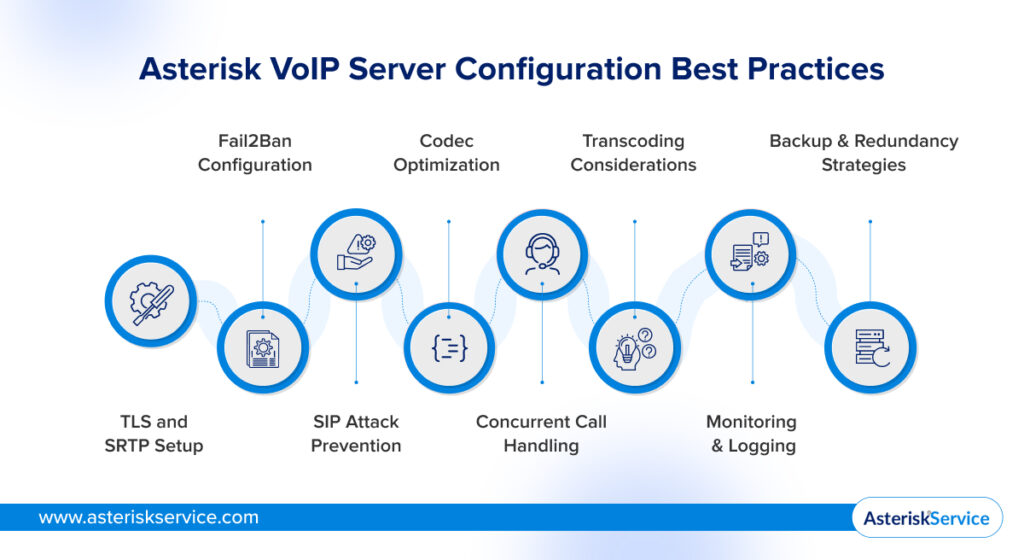
Asterisk VoIP Server Configuration Best Practices
Asterisk VoIP server configuration best practices, especially when integrating AI and Asterisk, focus on securing SIP communication, optimizing media performance, managing call traffic efficiently, and building enough redundancy to keep communication stable under real-world workloads.
Many VoIP systems work perfectly during testing.
Problems usually begin after real traffic starts hitting the PBX.
That is when security gaps, codec issues, NAT problems, and resource limitations start becoming visible.
1. TLS and SRTP Setup
TLS helps secure SIP signaling between endpoints and the PBX.
SRTP encrypts the actual voice media flowing through RTP streams.
Together, they help protect business conversations from interception, packet sniffing, and unauthorized monitoring across public networks.
Without encryption, SIP traffic can expose:
- Extension details
- Registration data
- Call metadata
- Voice streams
Modern business VoIP environments usually enable both TLS and SRTP as part of baseline PBX security.
2. Fail2Ban Configuration
Internet-facing SIP servers constantly receive automated login attempts.
Some PBXs get scanned within minutes of becoming publicly accessible.
Fail2Ban helps detect repeated authentication failures and automatically blocks suspicious IP addresses before attacks escalate.
Businesses commonly configure Fail2Ban with:
- SIP registration monitoring
- IP ban thresholds
- Automatic timeout rules
- Firewall integration
- Log-based threat detection
This creates an additional security layer around the PBX without affecting normal users.
3. SIP Attack Prevention
SIP attacks are one of the most common VoIP security problems.
These attacks often target weak credentials, open SIP ports, or poorly configured endpoints.
If left unsecured, attackers may attempt:
- Brute-force registrations
- Toll fraud
- SIP scanning
- Call hijacking
- Denial-of-service attacks
Businesses usually reduce exposure through:
- Strong authentication policies
- IP whitelisting
- Geo-restrictions
- Non-default SIP ports
- Session rate limiting
- Endpoint access controls
Security becomes especially important once remote users and softphones enter the environment.
4. Codec Optimization
Codecs directly influence call quality, bandwidth consumption, and server performance.
A high-quality codec may improve audio clarity but increase network usage.
Compressed codecs reduce bandwidth usage but may increase processing overhead.
Businesses usually optimize codecs based on:
- Network conditions
- Concurrent call volume
- Remote connectivity
- Device compatibility
- Voice quality requirements
G.711 is commonly used for high-quality internal communication.
Opus often performs better across unstable internet connections and remote environments.
5. Concurrent Call Handling
As organizations scale, the PBX must process larger volumes of SIP signaling and RTP media simultaneously.
Concurrent call capacity depends on several infrastructure factors, including:
- CPU resources
- RAM availability
- Codec usage
- Disk performance
- Network stability
- Transcoding activity
Underestimating concurrent call loads can create:
- Dropped calls
- Delayed audio
- SIP registration failures
- High latency
- Poor voice quality during peak traffic
That is why production Asterisk environments usually include capacity planning before deployment.
6. Transcoding Considerations
Transcoding happens when endpoints communicate using different codecs.
The PBX then converts audio between formats in real time.
Although useful, transcoding consumes significant processing power.
Heavy transcoding environments can quickly overload servers handling large call volumes.
Most businesses try to minimize unnecessary transcoding through standardized codec policies and compatible endpoint configurations.
7. Monitoring and Logging
VoIP infrastructure rarely fails without warning signs.
The challenge is noticing those signals before users experience service disruption.
Monitoring tools help track PBX behavior in real time.
This allows administrators to identify congestion, network instability, or security issues early.
Most Asterisk environments monitor:
- SIP registrations
- RTP packet quality
- Jitter and latency
- Packet loss
- CPU usage
- Memory utilization
- Active call sessions
- Call failure rates
Detailed logging also helps troubleshoot routing problems, failed registrations, and suspicious activity.
8. Backup and Redundancy Strategies
Communication downtime affects far more than phone calls.
It impacts support teams, sales operations, customer experience, and internal coordination.
Production VoIP environments usually prepare for failures before they happen.
Common redundancy strategies include:
- Automated PBX backups
- Database replication
- Secondary Asterisk servers
- Redundant SIP trunks
- Geographic failover routing
- High-availability clustering
These configurations help maintain service continuity even during hardware failures or network outages.
The difference between a basic PBX and a production-ready communication system usually comes down to how well the infrastructure handles security, traffic spikes, and operational failures under pressure.
Advanced Features Businesses Add to Asterisk VoIP Systems
Modern businesses rarely use Asterisk only for basic voice calling. As communication needs grow, the PBX usually expands into a larger platform supporting automation, analytics, browser-based communication, and customer engagement workflows.
1. WebRTC Integration
WebRTC allows users to make calls directly from web browsers without traditional desk phones. This helps businesses support browser calling, remote communication, and embedded voice features inside customer portals or internal applications.
Many organizations combine Asterisk with custom WebRTC Development Solutions to build more flexible communication environments.
2. AI Voicebot Integration
Asterisk and AI voicebot integration helps automate repetitive conversations that previously relied on human agents. Businesses use them for appointment scheduling, lead qualification, handling FAQs, and enabling intelligent call routing within their VoIP systems.
As AI gains access to live SIP and RTP streams, the PBX starts functioning more like an intelligent communication platform instead of a traditional phone system.
Businesses exploring conversational automation often integrate custom AI Voicebot Development with their Asterisk infrastructure.
3. CRM Connectivity
CRM integration connects communication directly with customer data and business workflows. Agents can instantly access customer history, support tickets, previous interactions, and call records during live conversations.
This improves response speed while creating more personalized customer interactions.
4. Call Analytics
Call analytics help businesses track communication performance in real time. Organizations commonly monitor queue activity, missed calls, agent response times, call duration, and peak traffic periods.
These insights help improve staffing decisions, routing efficiency, and customer support operations.
5. Multi-Tenant Deployment
Multi-tenant deployment allows multiple clients or departments to operate from the same Asterisk infrastructure while maintaining separate configurations and communication environments.
This model is widely used by telecom providers, hosted PBX companies, and enterprises managing large communication networks.
6. Contact Center Routing
Advanced routing logic helps distribute calls based on agent skills, queue conditions, department rules, or agent availability. This improves response efficiency and reduces unnecessary call transfers during high-volume support operations.
Many businesses extend these workflows into larger Contact Center Solutions with reporting and workforce management capabilities.
7. SBC Integration
Session Border Controllers help secure SIP traffic, manage network traversal, and stabilize communication between carriers, endpoints, and PBX systems.
SBC integration becomes especially important in distributed or internet-facing VoIP environments.
8. Real-Time Monitoring Dashboards
Real-time dashboards help administrators monitor active calls, SIP registrations, queue activity, media quality, and overall PBX performance from a centralized interface.
This visibility helps teams identify performance issues before they affect communication quality.
As businesses continue adding automation, analytics, and browser-based communication, Asterisk gradually evolves from a PBX into a larger real-time communication platform.
That flexibility is exactly where Asterisk starts standing out for businesses.
What are the Advantages of Using Asterisk for Business VoIP
The main advantages of using Asterisk for business VoIP include open-source flexibility, vendor independence, customizable communication workflows, better cost control, and long-term scalability.
Unlike traditional PBX systems, Asterisk gives businesses far more control over how communication infrastructure is built and managed.
1. Open-Source Flexibility
Asterisk is open-source, which means businesses can customize the PBX based on their operational needs instead of depending on fixed telecom features.
Organizations can modify routing logic, integrate third-party platforms, automate workflows, and expand communication capabilities without waiting for vendor-controlled updates.
This flexibility becomes especially valuable for businesses with unique communication requirements.
2. Vendor Independence
Many traditional PBX systems lock businesses into specific hardware vendors, licensing models, or telecom ecosystems.
Asterisk removes much of that dependency.
Businesses can choose their own SIP providers, infrastructure environments, endpoints, and integrations without being tied to a single vendor.
This creates greater long-term operational flexibility and infrastructure control.
3. Custom Workflows
Asterisk allows businesses to build communication workflows around their operations instead of adjusting operations around limited PBX features.
Organizations can create custom:
- IVR flows
- Call routing logic
- CRM integrations
- Queue strategies
- Automation workflows
This makes the PBX far more adaptable for support teams, contact centers, healthcare systems, telecom providers, and enterprise environments.
4. Cost Control
One of the biggest reasons businesses adopt Asterisk is cost efficiency.
Because the software itself is open-source, organizations avoid many licensing and feature-related expenses associated with traditional telecom systems.
Businesses also gain more control over:
- Infrastructure spending
- SIP provider selection
- Scaling costs
- Hardware decisions
- Deployment models
Over time, this can significantly reduce operational communication costs.
5. Scalability Potential
Asterisk can scale from small office deployments to large enterprise communication environments, handling thousands of concurrent calls.
As business communication grows, organizations can expand infrastructure gradually through additional servers, SIP capacity, routing layers, and communication services without rebuilding the entire system.
That scalability is one reason Asterisk continues powering everything from startup PBXs to large telecom and contact center environments.
That flexibility also creates the need for more customized VoIP environments.
When Businesses Need Custom Asterisk Development
Businesses usually need custom Asterisk development when standard PBX setups can no longer handle growing communication complexity, scalability demands, or business-specific workflows.
1. Multi-Location Deployments
Organizations operating across multiple offices often require centralized communication management with location-specific routing, failover handling, and remote connectivity support.
Custom development helps maintain a unified VoIP environment across distributed teams and branches.
2. Telecom-Grade Call Environments
Telecom providers and high-volume communication businesses usually require advanced SIP routing, load balancing, SBC integration, and high-availability infrastructure.
Standard PBX configurations often cannot support carrier-grade communication environments without customization.
3. High Concurrent Call Volumes
Large contact centers and enterprise communication systems handling heavy call traffic require optimized media handling and scalable routing logic.
Custom development helps maintain call quality and routing stability during peak traffic periods.
4. Powered Communication Workflows
Businesses integrating AI voicebots, conversational IVR, real-time transcription, or intelligent routing often require deeper SIP, RTP, and API-level customization inside the Asterisk environment.
This helps AI workflows operate directly within live communication streams.
5. Compliance-Sensitive Industries
Industries like healthcare, finance, and telecom often require encrypted communication, audit logging, secure call recording, and stricter access controls.
Custom development helps align communication infrastructure with compliance and security requirements.
6. Custom Integrations
Many businesses need the PBX to connect with CRM platforms, helpdesk systems, billing software, or internal applications.
Custom integrations help communication data flow smoothly across operational systems instead of remaining isolated inside the PBX.
7. Long-Term Scaling Needs
As communication infrastructure grows, businesses often need additional routing layers, traffic management, and infrastructure expansion.
Custom Asterisk development helps organizations scale more strategically without rebuilding the entire communication environment repeatedly.
That adaptability is one reason Asterisk continues powering enterprise VoIP systems and modern communication platforms at scale.
By this point, Asterisk starts looking far less like a PBX and far more like a communication infrastructure.
The Bottom Line?
Asterisk remains one of the most flexible ways to build a VoIP communication system. But successful deployments depend far more on architecture and configuration than installation alone.
The businesses getting the best results from Asterisk usually treat communication infrastructure as a long-term operational system instead of a quick PBX setup.
For organizations building scalable VoIP, WebRTC, or AI-powered communication environments, the real advantage comes from infrastructure designed to evolve with the business. That is exactly where Asterisk Services helps organizations build communication systems ready for long-term growth.
FAQs
What is an Asterisk VoIP system?
An Asterisk VoIP system is an open-source communication platform that allows businesses to manage voice calls over the internet instead of traditional phone lines.
Is Asterisk free to use?
Yes. Asterisk is open-source software, which means businesses can use and customize it without traditional PBX licensing costs.
Which operating system is best for Asterisk installation?
Most businesses deploy Asterisk on Linux distributions like Ubuntu, Debian, or CentOS because of their stability and long-term support.
What is SIP in Asterisk?
SIP is the signaling protocol that helps Asterisk establish, manage, and terminate voice communication sessions between endpoints and telecom networks.
Can Asterisk support IVR systems?
Yes. Asterisk supports fully customizable IVR systems for call routing, self-service menus, and automated customer interactions.