


Table of Contents
ToggleSummary:
You have an Asterisk setup running on a standard dialplan. It works flawlessly…until your product team asks for dynamic call routing, real-time event branching, or integration with an external AI engine. The dialplan cannot handle modern, asynchronous API logic cleanly, and traditional AGI scripts will block your threads under heavy load. Asterisk ARI is THE architectural shift that moves voice logic out of static configuration files and into real-time, event-driven code!If you are a telecom engineer, you know the exact moment your dialplan becomes a liability.
You start with a few simple routing rules. Then, the business requests database lookups before answering a call. Then, they want to integrate AI and stream the audio to a natural language processing (NLP) engine for intent classification. Suddenly, your extensions.conf is a chaotic mess of synchronous AGI scripts and brittle shell commands.
Asterisk Gateway Interface (AGI) is great for simple automation, but it operates as a synchronous, per-call subprocess. If your AGI script takes three seconds to query a CRM, that call thread is blocked. Scale that up to 1,000 concurrent calls, and your server will violently crash.
This is exactly why Asterisk introduced the Asterisk REST Interface (ARI). It shifts the paradigm completely. Instead of configuring the server to handle calls, you write an external application that controls calls in real-time. Asterisk becomes a plain media engine; your code becomes the brain.
Below, our experts have laid out the engineering reality of building an Asterisk ARI deployment, from enabling the interface to handling the WebSocket event stream.
What is ARI in Asterisk? (And Why It Replaces AGI)
Asterisk ARI is an asynchronous API introduced in Asterisk 12. It exposes a RESTful interface for command execution (like answering a call or playing a file) and a WebSocket channel for real-time event streaming.
When you ask an architect what ARI is in Asterisk, the answer boils down to control delegation.
With traditional dialplans or AGI, Asterisk is always in charge, occasionally asking your script what to do next.
With ARI, Asterisk parks the call in a specific application state and explicitly hands complete control over to your external code. Your application can now handle thousands of concurrent calls from a single, long-running process without blocking Asterisk’s core threads.
To understand where ARI fits, you have to look at the legacy interfaces. When evaluating ARI vs AGI Asterisk or the Asterisk ARI vs AMI (Asterisk Manager Interface) architectures, the deciding factor is always the depth of call control required.
| Interface | How It Works | Concurrency & State | Best For |
|---|---|---|---|
| AGI | Synchronous, per-call subprocess. | Blocking. Low concurrency. Spawns a new process per call. | Simple DTMF menus, single-call database dips. |
| AMI | TCP socket for event monitoring and actions. | Async. High concurrency. Cannot fully control call flow mid-flight. | Real-time dashboards, CRM screen-pops, click-to-dial. |
| ARI | Full call control via REST + async WebSocket events. | Fully Async. High concurrency. External app manages state. | Custom voice apps, AI integration, dynamic event-driven flows. |
How to Enable ARI in Asterisk?
ARI isn’t a third-party plugin you have to compile from source; it is built directly into modern, upgraded Asterisk (versions 12 and up). However, it is disabled by default.
To enable Asterisk ARI, you need to configure two core files. ARI relies heavily on Asterisk’s internal HTTP server to function, so you must first ensure that the HTTP module is running.
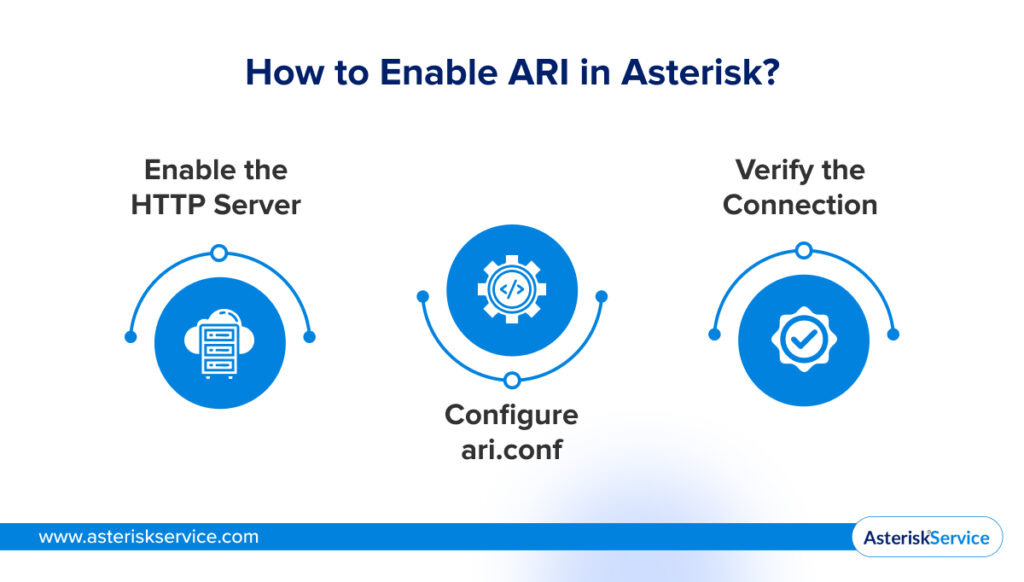
1. Enable the HTTP Server
Ensure res_http_websocket.so is loaded, and configure your /etc/asterisk/http.conf:
 [general]
 enabled=yes
 bindaddr=0.0.0.0
 bindport=8088
2. Configure ari.conf
Next, define your ARI application credentials and permissions in /etc/asterisk/ari.conf:
[general]
enabled=yes
pretty = yes ; Formats JSON responses nicely for debugging

[myapp]
type = user
read_only = no
password = supersecretpassword
password_format = plain
allowed_origins = http://localhost ; Restrict CORS for security
3. Verify the Connection
Restart Asterisk (core restart now or module reload res_ari.so). Do not assume it is working. Run a quick curl command to verify the REST interface is actively listening:
curl -v -u myapp:supersecretpassword http://localhost:8088/ari/asterisk/info
How Do Asterisk ARI Events Work?
The entire concept of an event-driven voice application relies on the Asterisk ARI WebSocket stream.
When an inbound call hits your Asterisk dialplan, you don’t use Dial() or Goto(). You use the Stasis() application.
Example: exten => 1000,1,Stasis(myapp)
The moment the dialplan executes Stasis(), Asterisk stops processing the call natively. It parks the channel and fires a WebSocket event to your external application. From that millisecond forward, your external app receives a continuous stream of JSON payloads detailing every state change on that channel.
The Critical Event Types
To build a functional Asterisk ARI app, your code must actively listen for and handle these specific Asterisk ARI events:
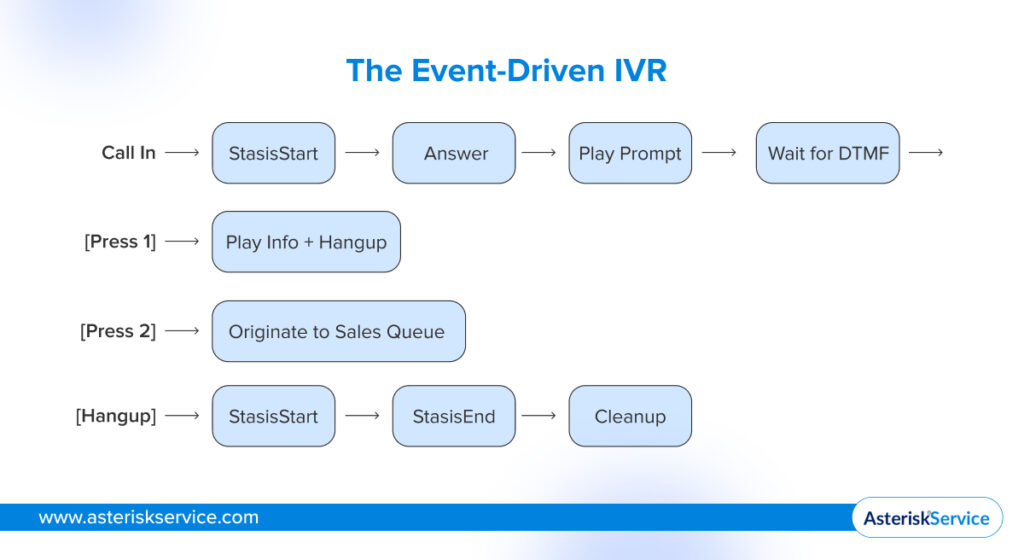
- StasisStart: The channel has entered your ARI app. This is the trigger for a new inbound call.
- ChannelDtmfReceived: The caller pressed a digit on their keypad.
- PlaybackFinished: An audio prompt (like a greeting) has finished playing.
- ChannelHangupRequest: The caller hung up the phone.
- StasisEnd: The channel has left your application (either via hangup or returning to the dialplan).
💡 Architect's Note
To truly grasp ARI, you have to stop thinking of Asterisk as a decision-maker. With ARI, Asterisk is stripped of its routing logic and demoted to a pure media engine. Your external application becomes the brain.
Asterisk simply streams every state change (answered, digit pressed, hung up) to your app as a JSON event over the WebSocket. Your app computes the logic, fires back a REST command, and Asterisk blindly executes it. Your code leads; the PBX follows.
The Event Loop Pattern
Think of ARI’s WebSocket stream like a real-time event bus for your PBX. Your application opens a persistent connection (ws://localhost:8088/ari/events?api_key=myapp:password&app=myapp).
When a StasisStart event arrives, your app reads the JSON, processes the logic, and issues a REST API POST request back to Asterisk telling it to answer the channel. Asterisk executes the action.
Because this is a completely asynchronous loop, you must never block the thread. If you execute a synchronous sleep command in your event handler, you will freeze the event processing for every other active call on the PBX.
Building a Simple Event-Driven IVR in Python
To prove how this works, let’s look at an Asterisk ARI Python implementation. The official library is ari-py (installable via pip install ari).
This Asterisk ARI tutorial script demonstrates the minimum viable logic required to handle a call: it answers, plays a prompt, listens for a DTMF digit, and originates an outbound call based on the input.
import ari
import logging

logging.basicConfig(level=logging.INFO)

# Step 1: Connect to the ARI WebSocket and REST interface
client = ari.connect('http://localhost:8088', 'myapp', 'supersecretpassword')

def on_stasis_start(channel_obj, ev):
	"""Handler for when a call enters the Stasis app."""
	channel = channel_obj.get('channel')
	logging.info(f"Incoming call on channel {channel.id}")

	# Step 2: Answer the channel
	channel.answer()

	# Step 3: Play a greeting
	channel.play(media='sound:hello-world')

def on_dtmf_received(channel_obj, ev):
	"""Handler for DTMF input."""
	digit = ev.get('digit')
	channel = channel_obj.get('channel')
	logging.info(f"Received digit: {digit}")

	if digit == '1':
    	# Step 4: Play confirmation and Hangup
    	channel.play(media='sound:goodbye')
    	channel.hangup()
	elif digit == '2':
    	# Step 5: Execute an Asterisk ARI originate command
    	logging.info("Originating call to Sales Queue...")
    	client.channels.originate(endpoint='SIP/sales_queue', extension='100',
    	context='default')

def on_stasis_end(channel_obj, ev):
	"""Cleanup handler."""
	logging.info("Call left Stasis. Cleaning up session data.")

# Map events to handler functions
client.on_channel_event('StasisStart', on_stasis_start)
client.on_channel_event('ChannelDtmfReceived', on_dtmf_received)
client.on_channel_event('StasisEnd', on_stasis_end)

# Start the async event loop
logging.info("Starting ARI Application: myapp")
client.run(apps='myapp')
Disclaimer: Please don’t copy-paste this directly into your production environment and go to lunch!
This is just the baseline to show you the mechanics. In a true production environment, you would need to layer in strict error handling, state machines, Redis to track the active session state of each call, and HTTP integration with your external APIs.
Real-World Use Cases Where ARI Outperforms Everything Else
If you are just building a standard “Press 1 for Sales” auto-attendant, ARI is overkill. ARI is built for scenarios where the call state is highly dynamic and relies on data outside of the PBX.
AI-Powered Call Routing
Connect ARI’s real-time events to an NLP engine. On StasisStart, ARI streams the raw RTP audio to your machine learning model. The model classifies the intent (“I need to reset my password”) and returns a JSON payload to your ARI app. Your ARI app then triggers an Asterisk ARI originate command to bridge the caller directly to the IT helpdesk (all in under 500 milliseconds!).
Learn more about AI with Asterisk for Advanced Call Routing and Voice Analysis.
Dynamic IVRs Without Dialplan Reloads
With ARI, your IVR logic exists entirely as code. Non-engineering teams can update call flow logic via a custom web CMS. Because the ARI app simply reads from a database to determine the next audio prompt, you can radically alter the IVR tree without ever reloading the Asterisk dialplan or dropping active calls.
Conditional Call Recording for Compliance
Imagine a fintech contact center that needs to strictly comply with PCI-DSS regulations. Using ARI, your app listens to the call state. The absolute second a customer begins entering their credit card number via DTMF, the ARI app dynamically issues a REST command to pause the channel recording. Once the input is complete, it issues a command to resume recording.
Advanced Conferencing Applications
You can use ARI’s bridges resource to build dynamic conference rooms on the fly. You can programmatically add or remove participants, selectively mute users based on web-panel clicks, and inject isolated audio prompts (like “You have 5 minutes remaining”) directly into specific channels without disrupting the rest of the conference.
Common Pitfalls and Production Gotchas
Building a lab script is easy. Architecting a carrier-grade ARI app that won’t crash under load requires dodging a few specific engineering traps.
1. Failing to Subscribe to All Events
When you connect to the WebSocket, you must append subscribeAll=true to the connection string, or explicitly subscribe to the channels you want to monitor. If you fail to do this, your app will only receive events for channels it explicitly originated. If a call is transferred into your app from a legacy dialplan, it will result in a silent failure because your app is blind to it.
2. Blocking the WebSocket Event Loop
ARI handles events asynchronously. If you execute a synchronous database query or a slow HTTP request inside your on_stasis_start event handler, you freeze the entire application thread. No other calls can be processed until that database query returns. Always use async/await in Python or promise chains in Node.js to keep the event loop spinning.
3. Ignoring StasisEnd Cleanup
If your Node or Python application crashes, Asterisk will often leave active channels stranded in the Stasis() application. You must implement watchdog timers and aggressively handle the StasisEnd event to ensure all bridges are destroyed, and database session states are cleared when a call drops.
4. Race Conditions on Fast Channels
Network latency is real. It is entirely possible for an aggressive caller to press a keypad digit before your REST API answer() command has fully executed. This means your app receives a ChannelDtmfReceived event for a channel it hasn’t technically finished answering yet. Build your state machine defensively and queue incoming events rather than dropping them if the channel state isn’t perfectly aligned.
💡 Expert Tip
Do not run an ARI script manually in a tmux session and call it a day.
In high-concurrency setups, deploy your ARI application behind a robust process manager like PM2 (Node.js) or systemd (Python) with auto-restart policies. ARI applications are critical, long-running infrastructure daemons. Treat them exactly like you treat your database services.
Asterisk ARI is not just another API wrapper; it is a fundamental uncoupling of media and logic.
By forcing the dialplan to yield control to an external application, ARI moves voice architecture out of static configuration files and into modern, maintainable code.
Whether you are piping RTP audio into a generative AI model or building dynamic, scalable IVRs that pull state from a Redis cluster, ARI is the engine that makes it possible.
Stop fighting the limitations of AGI, and start building true event-driven voice applications.Ready to architect a high-concurrency ARI application? Consult our SIP experts today!
FAQs
What is the difference between Asterisk ARI, AGI, and AMI?
AGI is a synchronous, blocking interface used to execute localized scripts on a per-call basis, which struggles under high concurrency.
AMI is an asynchronous TCP socket primarily used for monitoring events and executing simple commands like click-to-dial, but it cannot firmly control the active call flow.
ARI provides full, asynchronous control over call state and media via a REST API and WebSocket, making it the only choice for building complex, external voice applications like real-time AI over WebSocket media.
How do I enable ARI in Asterisk?
ARI is built into Asterisk 12+ but disabled by default. You must first enable Asterisk’s internal HTTP server by configuring bindaddr and bindport in /etc/asterisk/http.conf. Then, you configure /etc/asterisk/ari.conf to set enabled = yes and create a user profile with a plain-text password and appropriate CORS allowed origins.
What languages can I use to build Asterisk ARI applications?
Because ARI relies entirely on standard HTTP REST requests and WebSockets, you can build an application in virtually any modern programming language. Python (using ari-py) and Node.js (using ari-client) are the most popular due to their native handling of asynchronous events, but developers frequently use Go, Java, and C# for high-performance enterprise deployments.
Can I use Asterisk ARI for outbound call campaigns?
Yes. You can programmatically trigger outbound calls using the ARI REST API’s channels.originate endpoint. Because ARI tracks the state of the call via WebSocket events, you can build highly customized outbound dialers that precisely detect when a human answers, instantly routing them to a live agent or dropping them into a dynamic IVR flow.
Is Asterisk ARI production-ready for high call volumes?
Absolutely, provided your application architecture is solid. Because ARI is completely asynchronous, Asterisk can handle thousands of concurrent ARI channels. However, the bottleneck will be your external application. To scale effectively, you must write non-blocking code, use an external state store like Redis to manage active calls, and horizontally scale your application tier behind a load balancer.